架构8. 拥有你的控制流
如果你能掌控自己的控制流,就可以做很多有趣的事情。
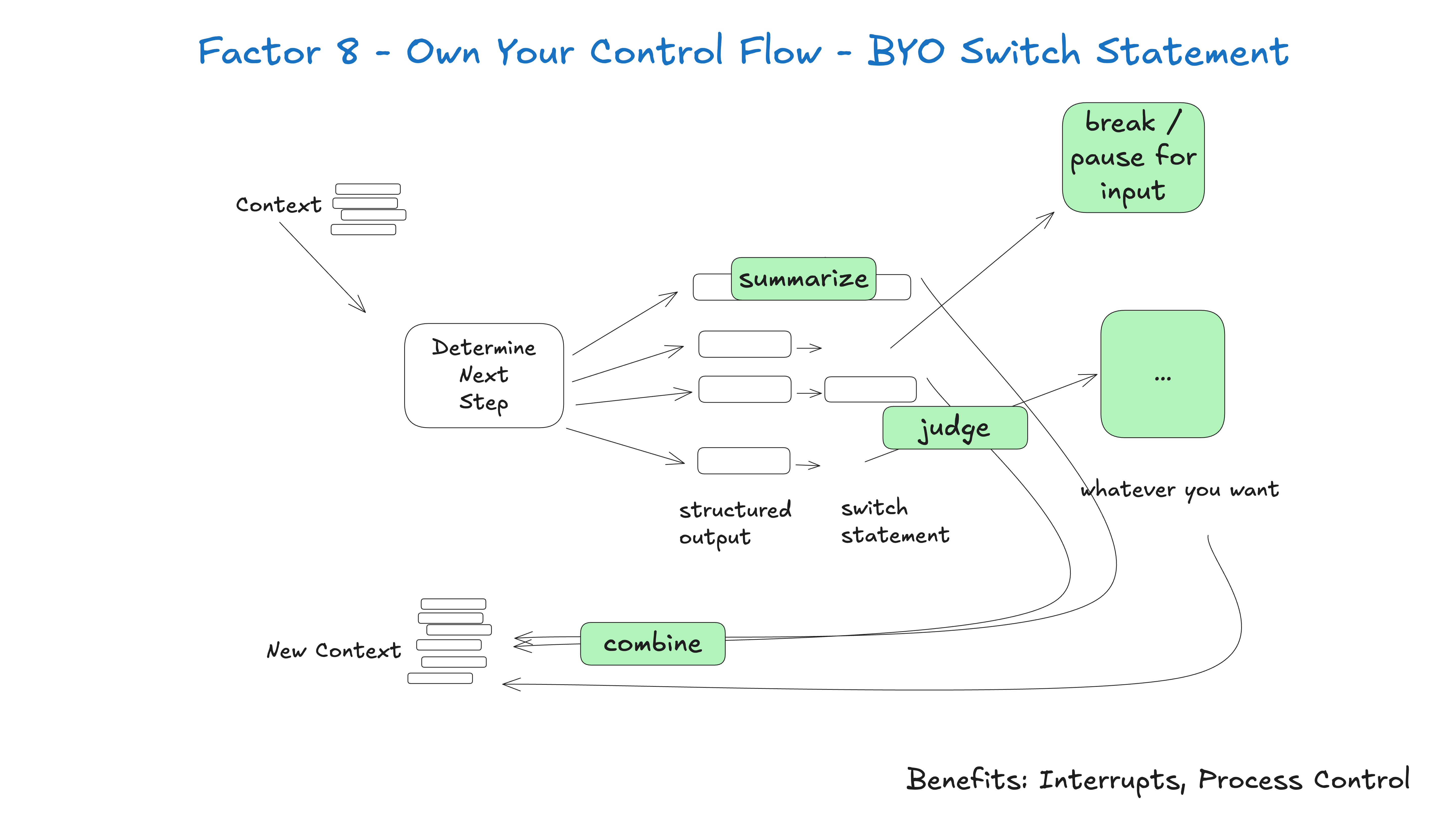
构建适合你特定用例的自定义控制结构。具体来说,某些类型的工具调用可能需要跳出循环,等待人工响应或其他长时间运行的任务(如训练流水线)。你可能还需要整合以下自定义实现:
- 工具调用结果的摘要或缓存
- 基于结构化输出的LLM作为评判者
- 上下文窗口压缩或其他内存管理技术
- 日志记录、追踪和指标收集
- 客户端速率限制
- 持久化睡眠/暂停/"等待事件"
以下示例展示了三种可能的控制流模式:
- request_clarification:模型请求更多信息,跳出循环并等待人工响应
- fetch_git_tags:模型请求获取git标签列表,获取标签后附加到上下文窗口,并直接返回给模型
- deploy_backend:模型请求部署后端,这是一个高风险操作,因此跳出循环并等待人工批准
def handle_next_step(thread: Thread):

  while True:
    next_step = await determine_next_step(thread_to_prompt(thread))

    # inlined for clarity - in reality you could put
    # this in a method, use exceptions for control flow, or whatever you want
    if next_step.intent == 'request_clarification':
      thread.events.append({
        type: 'request_clarification',
          data: nextStep,
        })

      await send_message_to_human(next_step)
      await db.save_thread(thread)
      # async step - break the loop, we'll get a webhook later
      break
    elif next_step.intent == 'fetch_open_issues':
      thread.events.append({
        type: 'fetch_open_issues',
        data: next_step,
      })

      issues = await linear_client.issues()

      thread.events.append({
        type: 'fetch_open_issues_result',
        data: issues,
      })
      # sync step - pass the new context to the LLM to determine the NEXT next step
      continue
    elif next_step.intent == 'create_issue':
      thread.events.append({
        type: 'create_issue',
        data: next_step,
      })

      await request_human_approval(next_step)
      await db.save_thread(thread)
      # async step - break the loop, we'll get a webhook later
      break
这种模式允许你根据需要中断和恢复智能体的工作流程,从而创建更自然的对话和工作流。
示例 - 我对所有AI框架的首要功能需求是能够中断正在工作的智能体并在之后恢复,特别是在工具选择和工具调用之间的时刻。
如果没有这种可恢复性/粒度,就无法在工具调用运行前进行审查/批准,这意味着你被迫选择以下之一:
在等待长时间运行任务完成时,将任务暂停在内存中(考虑while...sleep方式),如果进程中断则从头开始重启
限制智能体只能进行低风险、低价值的调用,如研究和摘要
赋予智能体执行更大、更有用操作的权限,然后只能祈祷它不会搞砸
你可能会注意到这与架构5 - 统一执行状态和业务状态和架构6 - 通过简单API启动/暂停/恢复密切相关,但可以独立实现。