架构3. 掌控你的上下文窗口
在任何给定时刻,你在智能体中输入给 LLM 的内容本质上是:“这是到目前为止发生的情况,下一步该怎么做?”
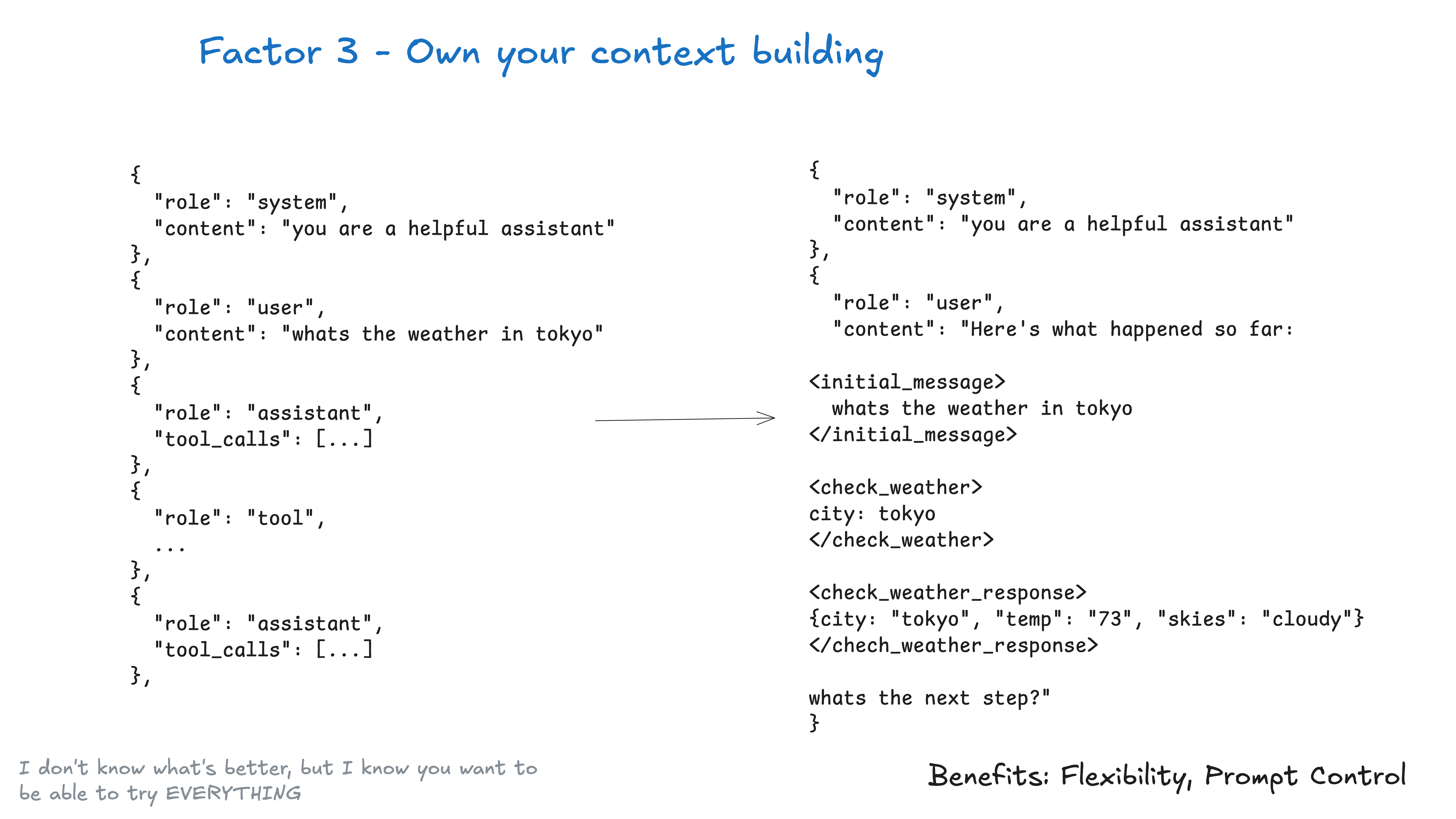
一切都是上下文工程。LLM 是无状态的函数,它们将输入转换为输出。为了获得最佳输出,你需要提供最佳的输入。
创建优秀的上下文意味着:
- 你提供给模型的提示(prompt)和指令(instructions)
- 你检索的任何文档或外部数据(例如 RAG)
- 任何过去的状态、工具调用、结果或其他历史记录
- 来自相关但独立的历史记录/对话的任何过去消息或事件(记忆 Memory)
- 关于输出何种结构化数据的指令
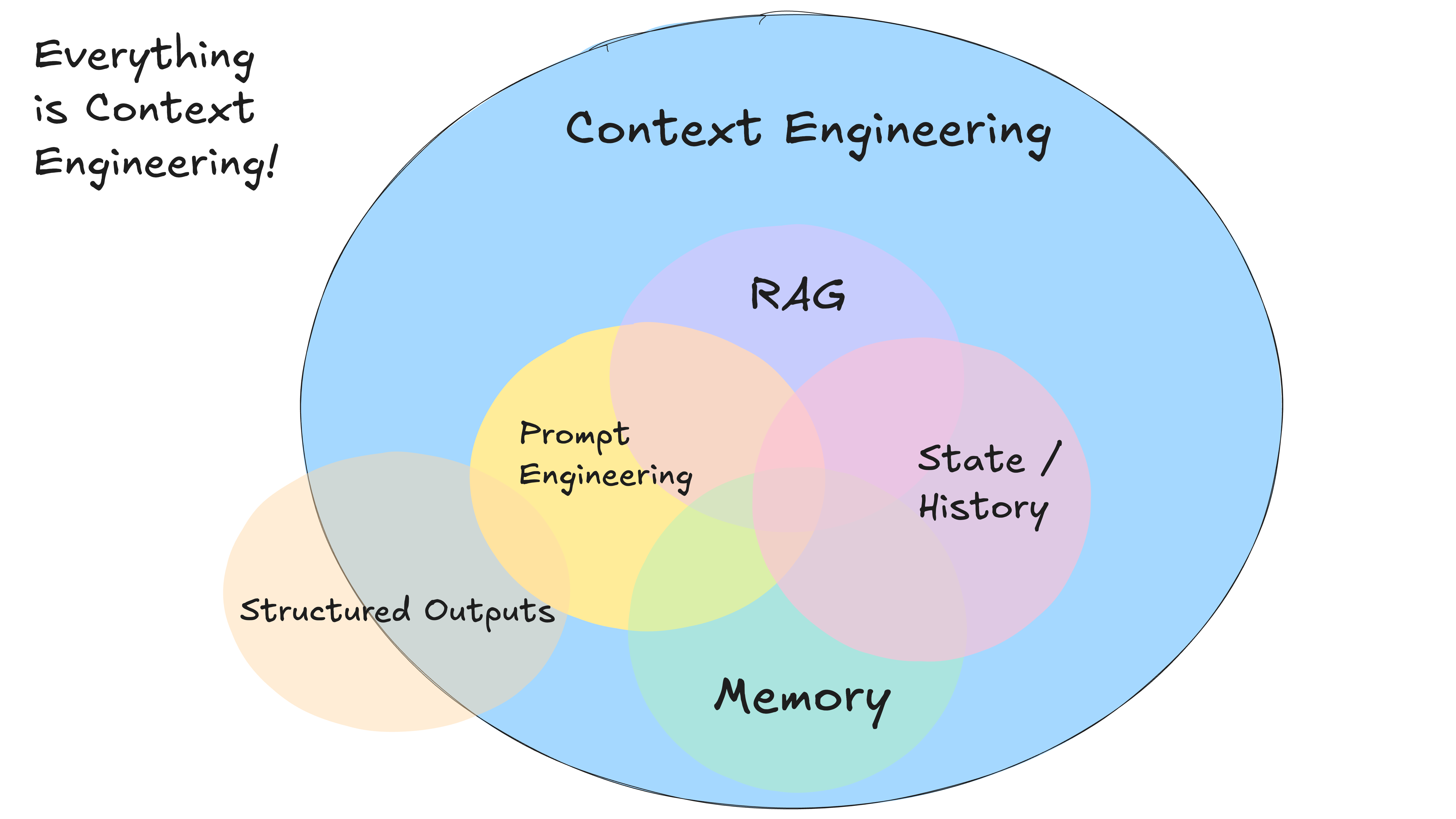
关于上下文工程 (on context engineering)
本指南旨在充分利用当今模型的潜力。 明细不包括下面的情况:
- 更改模型参数,如 temperature, top_p, frequency_penalty, presence_penalty 等。
- 训练你自己的补全(completion)或嵌入(embedding)模型
- 微调(Fine-tuning)现有模型
再次强调,我不知道将上下文交给 LLM 的最佳方式是什么,但我知道你需要能够尝试所有方法的灵活性。
标准 vs 自定义上下文格式 (Standard vs Custom Context Formats)
大多数 LLM 客户端使用类似这样的标准基于消息的格式:
[
  {
    "role": "system",
    "content": "You are a helpful assistant..."
  },
  {
    "role": "user",
    "content": "Can you deploy the backend?"
  },
  {
    "role": "assistant",
    "content": null,
    "tool_calls": [
      {
        "id": "1",
        "name": "list_git_tags",
        "arguments": "{}"
      }
    ]
  },
  {
    "role": "tool",
    "name": "list_git_tags",
    "content": "{\"tags\": [{\"name\": \"v1.2.3\", \"commit\": \"abc123\", \"date\": \"2024-03-15T10:00:00Z\"}, {\"name\": \"v1.2.2\", \"commit\": \"def456\", \"date\": \"2024-03-14T15:30:00Z\"}, {\"name\": \"v1.2.1\", \"commit\": \"abe033d\", \"date\": \"2024-03-13T09:15:00Z\"}]}",
    "tool_call_id": "1"
  }
]
虽然这对于大多数用例来说非常有效,但如果你想要真正最大限度地利用当今的 LLM,你需要以最节省 token 和注意力(attention-efficient)的方式将你的上下文输入到 LLM 中。
作为标准基于消息格式的替代方案,你可以构建针对你的用例优化的自定义上下文格式。例如,你可以使用自定义对象,并根据需要将它们打包/展开到一个或多个用户(user)、系统(system)、助手(assistant)或工具(tool)消息中。
以下是将整个上下文窗口放入单个用户消息的示例:
[
  {
    "role": "system",
    "content": "You are a helpful assistant..."
  },
  {
    "role": "user",
    "content": |
            Here's everything that happened so far:

        <slack_message>
            From: @alex
            Channel: #deployments
            Text: Can you deploy the backend?
        </slack_message>

        <list_git_tags>
            intent: "list_git_tags"
        </list_git_tags>

        <list_git_tags_result>
            tags:
              - name: "v1.2.3"
                commit: "abc123"
                date: "2024-03-15T10:00:00Z"
              - name: "v1.2.2"
                commit: "def456"
                date: "2024-03-14T15:30:00Z"
              - name: "v1.2.1"
                commit: "ghi789"
                date: "2024-03-13T09:15:00Z"
        </list_git_tags_result>

        what's the next step?
    }
]
模型可能会根据你提供的工具模式推断出你正在询问它 下一步该怎么做,但将其融入你的提示模板中总没有坏处。
代码示例
我们可以用类似下面的代码来构建它:
class Thread:
  events: List[Event]

class Event:
  # could just use string, or could be explicit - up to you
  type: Literal["list_git_tags", "deploy_backend", "deploy_frontend", "request_more_information", "done_for_now", "list_git_tags_result", "deploy_backend_result", "deploy_frontend_result", "request_more_information_result", "done_for_now_result", "error"]
  data: ListGitTags | DeployBackend | DeployFrontend | RequestMoreInformation |
        ListGitTagsResult | DeployBackendResult | DeployFrontendResult | RequestMoreInformationResult | string

def event_to_prompt(event: Event) -> str:
    data = event.data if isinstance(event.data, str) \
           else stringifyToYaml(event.data)

    return f"<{event.type}>\n{data}\n</{event.type}>"


def thread_to_prompt(thread: Thread) -> str:
  return '\n\n'.join(event_to_prompt(event) for event in thread.events)
上下文窗口示例
使用这种方法,上下文窗口可能如下所示:
初始 Slack 请求:
<slack_message>
    From: @alex
    Channel: #deployments
    Text: Can you deploy the latest backend to production?
</slack_message>
列出 Git 标签后:
<slack_message>
    From: @alex
    Channel: #deployments
    Text: Can you deploy the latest backend to production?
    Thread: []
</slack_message>

<list_git_tags>
    intent: "list_git_tags"
</list_git_tags>

<list_git_tags_result>
    tags:
      - name: "v1.2.3"
        commit: "abc123"
        date: "2024-03-15T10:00:00Z"
      - name: "v1.2.2"
        commit: "def456"
        date: "2024-03-14T15:30:00Z"
      - name: "v1.2.1"
        commit: "ghi789"
        date: "2024-03-13T09:15:00Z"
</list_git_tags_result>
出错和恢复后:
<slack_message>
    From: @alex
    Channel: #deployments
    Text: Can you deploy the latest backend to production?
    Thread: []
</slack_message>

<deploy_backend>
    intent: "deploy_backend"
    tag: "v1.2.3"
    environment: "production"
</deploy_backend>

<error>
    error running deploy_backend: Failed to connect to deployment service
</error>

<request_more_information>
    intent: "request_more_information_from_human"
    question: "I had trouble connecting to the deployment service, can you provide more details and/or check on the status of the service?"
</request_more_information>

<human_response>
    data:
      response: "I'm not sure what's going on, can you check on the status of the latest workflow?"
</human_response>
从这里开始,你的下一步可能是:
nextStep = await determine_next_step(thread_to_prompt(thread))
{
  "intent": "get_workflow_status",
  "workflow_name": "tag_push_prod.yaml",
}
XML 风格的格式只是一个例子——关键在于你可以构建适合你应用程序的自定义格式。如果你能灵活地尝试不同的上下文结构、决定存储什么以及传递给 LLM 什么,你将获得更好的输出质量。
掌控你的上下文窗口的主要好处:
- 信息密度 (Information Density) :以最大化 LLM 理解的方式构建信息
- 错误处理 (Error Handling) :以有助于 LLM 恢复的格式包含错误信息。考虑在错误和失败调用解决后将其从上下文窗口中隐藏。
- 安全性 (Safety) :控制传递给 LLM 的信息,过滤掉敏感数据
- 灵活性 (Flexibility) :随着你了解什么最适合你的用例而调整格式
- Token 效率 (Token Efficiency) :优化上下文格式以提高 token 效率和 LLM 理解
上下文包括:提示(prompts)、指令(instructions)、RAG 文档、历史记录、工具调用、记忆(memory)
记住:上下文窗口是你与 LLM 交互的主要界面。掌控如何构建和呈现信息可以显著提高你的智能体性能。
示例 - 信息密度 - 相同的信息,更少的 token:
并非我一家之言
上下文工程开始成为一个相当流行的术语
还有一份相当不错的上下文工程速查表
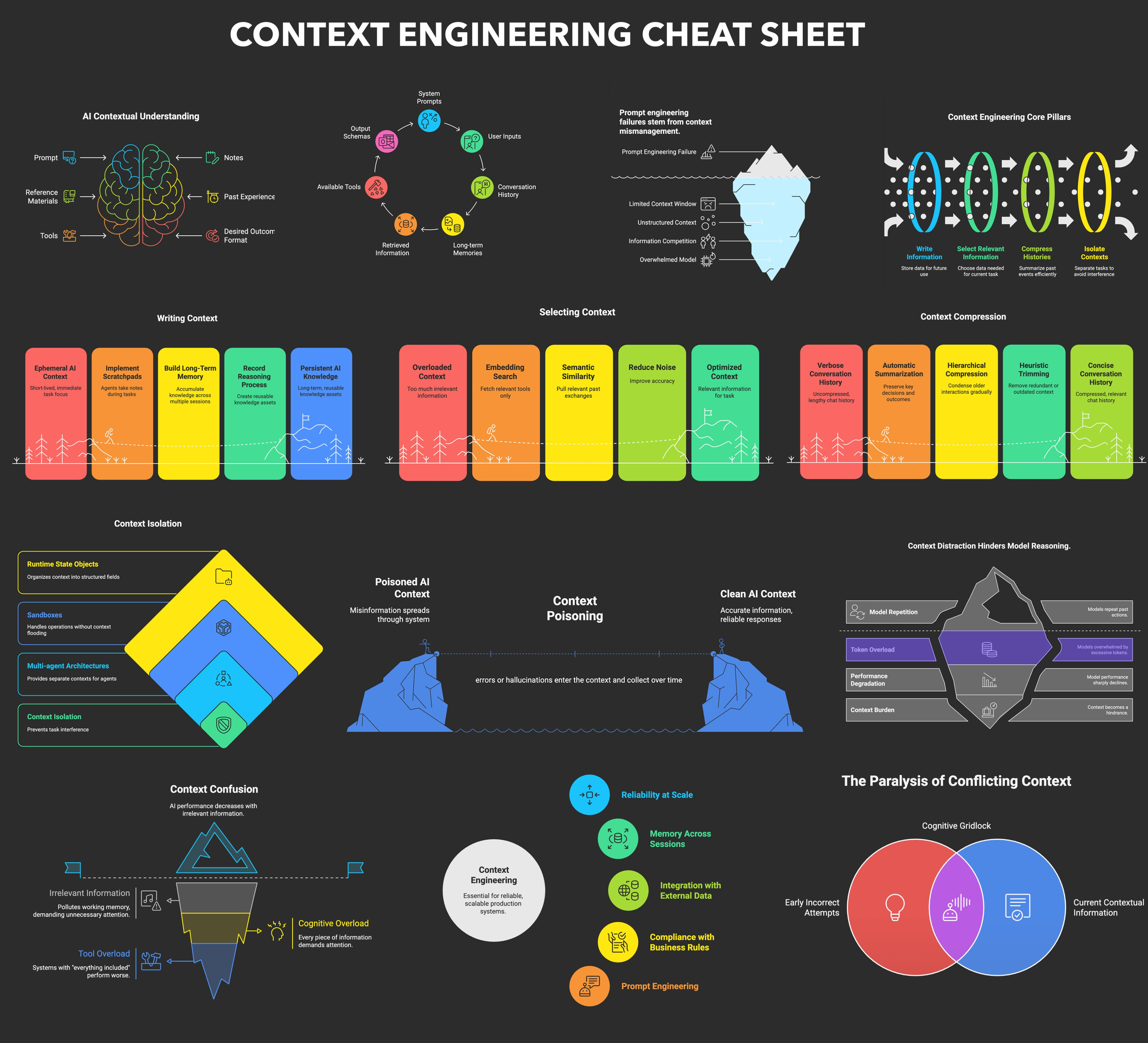
这里的反复出现的主题是:我不知道什么是最好的方法,但我知道你需要能够尝试所有方法的灵活性。